Interlinear New Testamentየአዲስ ኪዳን Interlinear
A complete guide to the current public Philippians, Galatians, and Ephesians GTM Greek–Amharic–English Teaching Editions.
አሁን በሕዝብ ፊት ያሉትን የፊልጵስዩስ፣ የገላትያና የኤፌሶን GTM Greek–Amharic–English የማስተማሪያ እትሞች ለመጠቀም የተዘጋጀ ሙሉ መመሪያ።
What the current Interlinear providesየአሁኑ Interlinear ምን ያቀርባል?
The public Interlinear is a set of finished GTM teaching editions. It currently provides Philippians, Galatians, and Ephesians. Each edition combines the 1904 Patriarchal Greek teaching text with English and Amharic teaching layers, morphology, lemma/Strong’s data, Modern-Greek pronunciation aids, whole-book search, selected textual-comparison notes, and reading/teaching display controls.
1. Choose a teaching edition1. የማስተማሪያ እትም መምረጥ
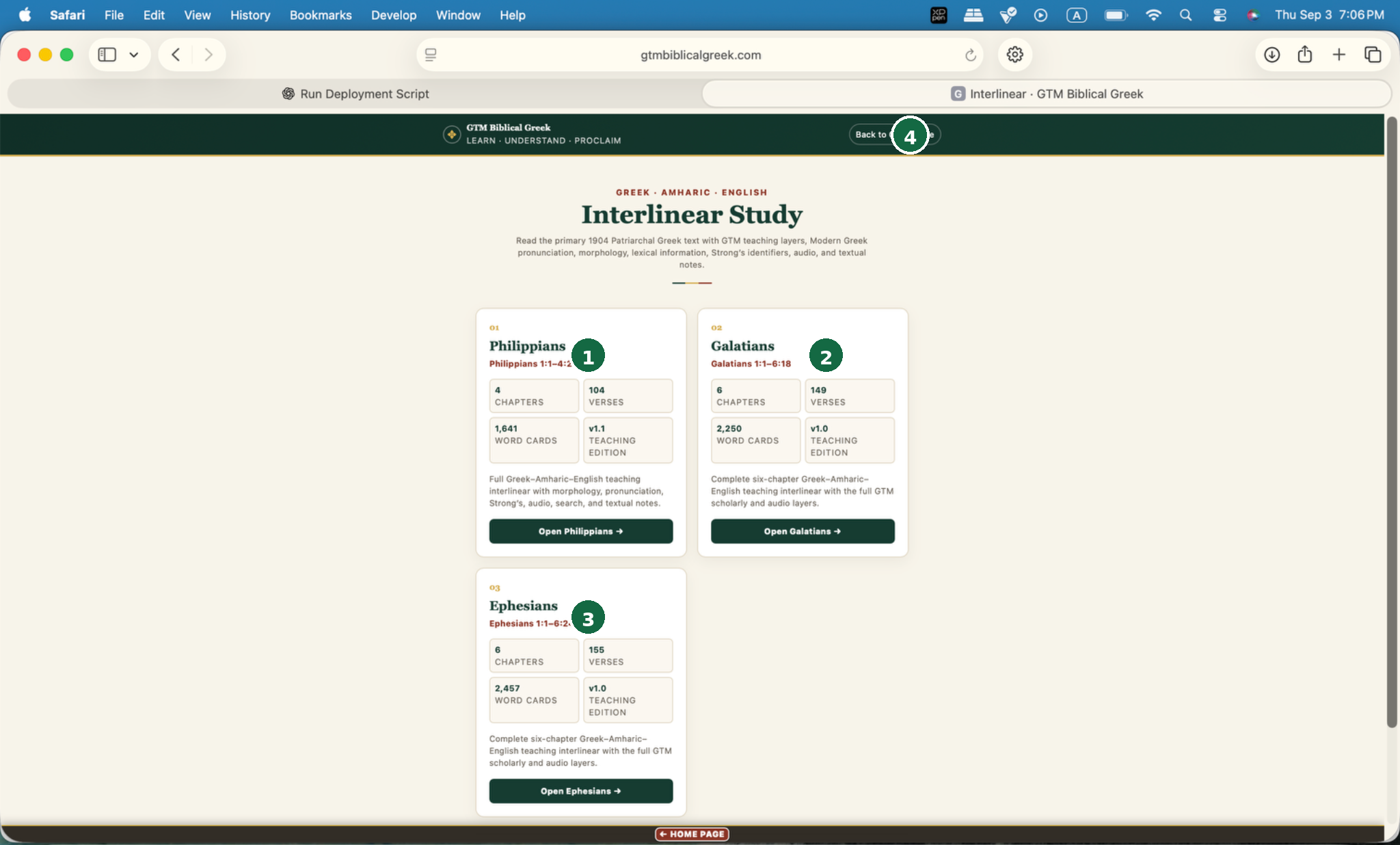
4 chapters · 104 verses · 1,641 word cards · v1.1.4 ምዕራፎች · 104 ጥቅሶች · 1,641 የቃላት ካርዶች · v1.1።
6 chapters · 149 verses · 2,250 word cards · v1.0.6 ምዕራፎች · 149 ጥቅሶች · 2,250 የቃላት ካርዶች · v1.0።
6 chapters · 155 verses · 2,457 word cards · v1.0.6 ምዕራፎች · 155 ጥቅሶች · 2,457 የቃላት ካርዶች · v1.0።
Returns to the main GTM platform.ወደ ዋናው GTM platform ይመልሳል።
Click Open Philippians →, Open Galatians →, or Open Ephesians →. The home page also states the GTM textual policy: PT1904/Antoniades is the primary teaching/display text, Modern Greek pronunciation is normative, and NA28/UBS5 are secondary comparators where noted.
በInterlinear መነሻ ገጽ ላይ የሚፈልጉትን የመጽሐፍ ካርድ ይምረጡ። የማስተማሪያ ጽሑፉ PT1904/Antoniades ነው፤ Modern Greek pronunciation መደበኛው የአነባበብ መርህ ነው፤ NA28/UBS5 ለማነጻጸር የሚጠቅሙ ሁለተኛ ጽሑፎች ናቸው።
2. Complete book-interface map2. የመጽሐፉ መገናኛ ካርታ
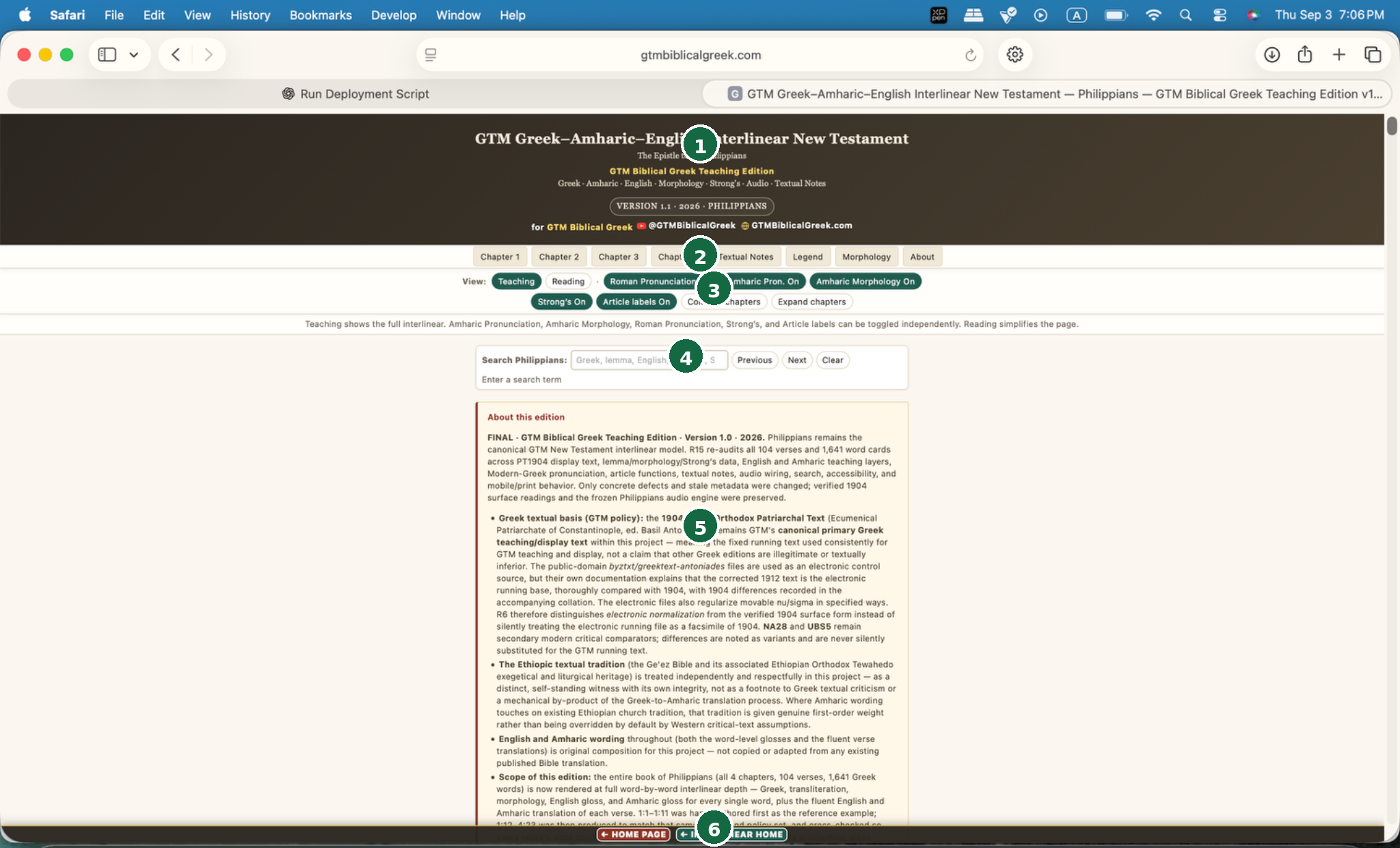
Book, version/year, build/release status.የመጽሐፉ ስም፣ version/year እና build/release ሁኔታ።
Chapter tabs + Textual Notes + Legend + Morphology + About. Ephesians also exposes Release Audit.የምዕራፍ tabs፣ Textual Notes፣ Legend፣ Morphology እና About ያካትታል። Ephesians በተጨማሪ Release Auditን ያሳያል።
Teaching/Reading and the independent teaching-layer toggles.Teaching/Reading modesን እና በተናጠል የሚበሩ/የሚጠፉ teaching layersን ይቆጣጠራል።
Greek, lemma, English, Amharic, or Strong’s; Previous / Next / Clear.በGreek፣ lemma፣ English፣ Amharic ወይም Strong’s መፈለግ ይቻላል፤ Previous / Next / Clear መቆጣጠሪያዎችም አሉ።
Scope, text policy, audio behavior, edition history and coverage.የስራው scope፣ text policy፣ የድምፅ አሠራር፣ የedition ታሪክ እና ሽፋን ያብራራል።
Home Page and Interlinear Home.ወደ Home Page እና Interlinear Home ይመልሳሉ።
3. Teaching vs Reading3. የማስተማሪያ ሁነታ እና የንባብ ሁነታ
Shows the full interlinear teaching framework. English morphology remains part of the normal Teaching display. The optional Amharic Pronunciation and Amharic Morphology layers begin OFF by default and can be turned on when needed. Use Teaching when studying morphology, pronunciation, lemmas, Strong’s identifiers, article function and word-level meanings.
የማስተማሪያ ሁነታ ሙሉ የጥናት ንብርብሮችን ያሳያል፦ morphology፣ አነባበብ፣ lemma፣ Strong’s እና gloss። የንባብ ሁነታ ጽሑፉን ቀለል አድርጎ ለተከታታይ ንባብ ያቀርባል።
Simplifies the page so the Greek and fluent reading experience is less crowded. Switch back to Teaching whenever you need the full analytical layers.
ገጹን ለቀላል ንባብ ወይም ለሙሉ ትንተና መስተካከል ይችላሉ። Reading mode የማስተማሪያ ንብርብሮችን ያሳንሳል፤ Teaching mode ደግሞ ሙሉ የቃል መረጃን ያሳያል።
4. Every display toggle4. የማሳያ መቀያየሪያዎች
| Control | What it changesምን እንደሚቀይር |
|---|---|
| Roman PronunciationበRoman ፊደል አነባበብ | Shows/hides the Roman-letter pronunciation line. It is sound-based and follows GTM’s Modern-Greek policy; it is not Erasmian transliteration.በRoman ፊደል የተጻፈውን የአነባበብ መስመር ያሳያል/ይደብቃል። ይህ በድምፅ ላይ የተመሠረተ ሲሆን የGTM Modern Greek መመሪያን ይከተላል፤ Erasmian transliteration አይደለም። |
| Amharic Pron.የአማርኛ አነባበብ | Shows/hides the Amharic-script pronunciation aid. OFF by default in the English-oriented initial display; turn it on whenever Amharic pronunciation support is wanted.በአማርኛ ፊደል የተጻፈውን የአነባበብ መርጃ ያሳያል/ይደብቃል። በመጀመሪያ ማሳያ ላይ በነባሪነት OFF ነው፤ ሲያስፈልግ ማብራት ይችላሉ። |
| Amharic Morphologyየአማርኛ ሞርፎሎጂ | Shows/hides the learner-facing Amharic explanation of the Greek morphology. OFF by default in the English-oriented initial display; turn it on whenever Amharic grammatical explanation is wanted.የግሪክ morphologyን በአማርኛ የሚያብራራውን የተማሪ መረጃ ያሳያል/ይደብቃል። በመጀመሪያ ማሳያ ላይ በነባሪነት OFF ነው፤ ሲያስፈልግ ማብራት ይችላሉ። |
| Strong’sStrong’s | Shows/hides the verified Greek Strong’s identifier mapped from the lemma.ከlemmaው ጋር የተያያዘውን የተረጋገጠ Greek Strong’s identifier ያሳያል/ይደብቃል። |
| Article labelsየarticle መለያዎች | Shows/hides contextual article-function labels where supplied.በተሰጡበት ቦታ የarticleን አገባባዊ ተግባር የሚያሳዩ መለያዎችን ያሳያል/ይደብቃል። |
| Collapse chaptersምዕራፎችን ዝጋ | Collapses all chapter bodies for faster navigation.ፈጣን መንቀሳቀስ እንዲቻል የሁሉንም ምዕራፎች ይዘት ይዘጋል። |
| Expand chaptersምዕራፎችን ዘርጋ | Expands all chapter bodies.የሁሉንም ምዕራፎች ይዘት ይከፍታል። |
5. Whole-book search5. የሙሉ መጽሐፍ ፍለጋ
- Click the search field at the top of the edition or at the start of a chapter.በedition አናት ወይም በምዕራፉ መጀመሪያ ያለውን የፍለጋ መስክ ይጫኑ።
- Enter Greek, a lemma, English, Amharic, or a Strong’s identifier.Greek፣ lemma፣ English፣ Amharic ወይም Strong’s identifier ያስገቡ።
- The page reports the number of matching verses and highlights/opens matching locations.ገጹ የተዛመዱ ጥቅሶችን ብዛት ያሳያል፣ የተገኙትን ቦታዎችም ያጎላል/ይከፍታል።
- Use Previousየቀድሞው and Next to move through matches.በተገኙት ውጤቶች መካከል ለመንቀሳቀስ።
- Use Clear to remove the query and highlights.የፍለጋ ቃሉንና ማጉላቶቹን ለማጥፋት።
Galatians and Ephesians explicitly synchronize the top search with a search control at the beginning of every chapter and can auto-expand chapters containing results.Galatians እና Ephesians የላይኛውን ፍለጋ በእያንዳንዱ ምዕራፍ መጀመሪያ ካለው search control ጋር ያመሳስላሉ፣ ውጤት ያላቸውን ምዕራፎችም በራሳቸው ሊከፍቱ ይችላሉ።
6. Read a verse from sentence to word6. ከሐረግ ወደ ቃል በመሄድ ጥቅስን ማንበብ
- Choose the chapter.ምዕራፉን ይምረጡ።
- Locate the verse reference. Each verse is labelledየጥቅሱን reference ያግኙ። እያንዳንዱ ጥቅስ እንዲህ ተሰይሟል፦ full interlinearሙሉ interlinear.
- Read/click the complete Greek verse line first.መጀመሪያ ሙሉውን የግሪክ ጥቅስ መስመር ያንብቡ/ይጫኑ።
- Read the fluent English and Amharic verse lines.ተነባቢውን የእንግሊዝኛና የአማርኛ ጥቅስ ያንብቡ።
- Use the word cards only where you need pronunciation, morphology, lemma, Strong’s or gloss help.pronunciation፣ morphology፣ lemma፣ Strong’s ወይም gloss እገዛ በሚያስፈልግዎት ቦታ ብቻ word cardsን ይጠቀሙ።
- Use a textual note when the verse has a selected GTM 1904 vs NA28/UBS5 comparison.ጥቅሱ የተመረጠ GTM 1904 vs NA28/UBS5 ንጽጽር ካለው textual note ይጠቀሙ።
7. Every field in a teaching word card7. የማስተማሪያ የቃል ካርድ መረጃዎች
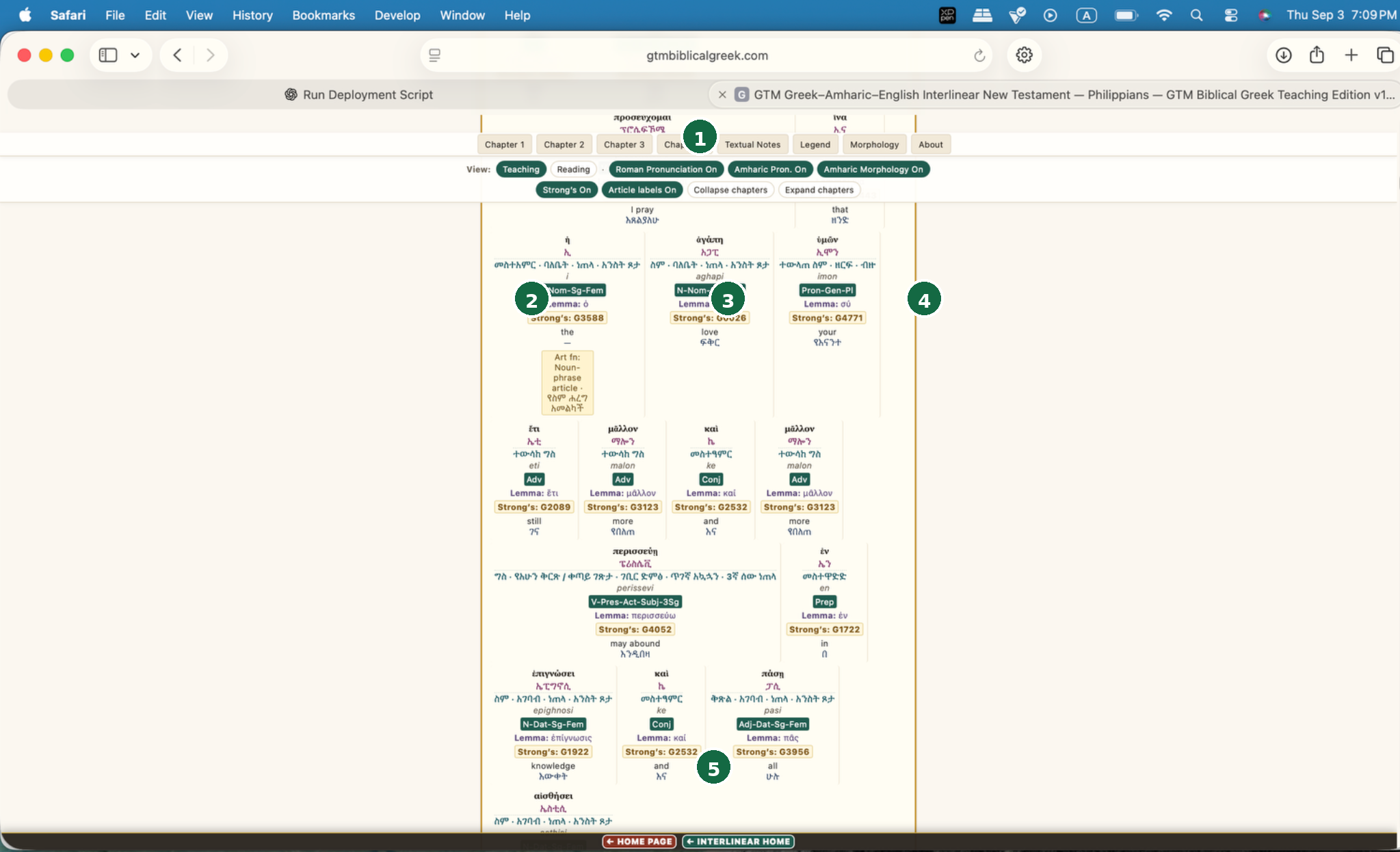
Keep or hide layers while you study.በሚያጠኑበት ጊዜ layersን ያሳዩ ወይም ይደብቁ።
Surface form and pronunciation aids.የታየው የግሪክ ቃል ቅርጽና የአነባበብ መርጃዎች።
Compact code plus expanded English/Amharic explanation.አጭር code እና የተስፋፋ የእንግሊዝኛ/አማርኛ ማብራሪያ።
Headword, concordance ID, English and Amharic meaning; article-function label when present.Headword፣ concordance ID፣ የእንግሊዝኛና የአማርኛ ትርጉም፤ article-function label ካለም ያሳያል።
Continue reading cards within the full verse/chapter.በሙሉ ጥቅሱ/ምዕራፉ ውስጥ word cardsን በመከተል ያንብቡ።
| Field | Meaning |
|---|---|
| Greek surfaceየግሪክ ገጽታ | The form actually displayed in the running Patriarchal Greek text. Clicking a Greek word can trigger its pronunciation.በPatriarchal Greek running text ውስጥ በትክክል የሚታየው የቃሉ ቅርጽ። የግሪክ ቃሉን መጫን አነባበቡን ሊያጫውት ይችላል። |
| Amharic pronunciationየአማርኛ አነባበብ | Amharic-script pronunciation aid.በአማርኛ ፊደል የቀረበ የአነባበብ መርጃ። |
| Amharic morphologyየአማርኛ ሞርፎሎጂ | Amharic grammatical description of the Greek form.የግሪክ ቃሉን ሰዋሰዋዊ ቅርጽ በአማርኛ ያብራራል። |
| Roman pronunciationበሮማን ፊደል አነባበብ | Modern-Greek sound-based Roman representation.በModern Greek ድምፅ ላይ የተመሠረተ የRoman-letter አነባበብ ነው። |
| Morphology codeየሞርፎሎጂ ኮድ | Compact parse such asእንደሚከተለው ያለ አጭር parse፦ N-Gen-Sg-Masc. |
| Expanded morphologyየተስፋፋ የሞርፎሎጂ ማብራሪያ | English description such as “Noun · genitive · singular · masculine.”እንደ “Noun · genitive · singular · masculine” ያለ የተስፋፋ የእንግሊዝኛ ሰዋሰዋዊ ማብራሪያ። |
| Lemma | Dictionary/headword form.የመዝገበ-ቃላት ዋና የቃል ቅርጽ። |
| Strong’sStrong’s | Verified Greek Strong’s identifier mapped lemma-by-lemma.ለእያንዳንዱ lemma የተያያዘ የተረጋገጠ የግሪክ Strong’s identifier። |
| English glossየእንግሊዝኛ አጭር ትርጉም | Word-level English teaching meaning.በቃል ደረጃ የሚቀርብ የእንግሊዝኛ የማስተማሪያ ትርጉም። |
| Amharic glossየአማርኛ አጭር ትርጉም | Word-level Amharic teaching meaning.በቃል ደረጃ የሚቀርብ የአማርኛ የማስተማሪያ ትርጉም። |
| Article functionየarticle ተግባር | Conditional contextual function label, e.g. with adjective/participle/noun phrase, where supplied.በአገባቡ መሠረት የarticleን ተግባር የሚያሳይ መለያ፤ ለምሳሌ ከadjective፣ participle ወይም noun phrase ጋር ሲገናኝ፣ መረጃው በተሰጠበት ቦታ። |
8. Greek audio: verse, word, highlighting and Stop 8. የግሪክ ድምፅ፦ ቁጥር፣ ቃል፣ highlighting እና Stop
The current Philippians, Galatians and Ephesians Teaching Editions use fixed, server-hosted Modern Greek recordings with a consistent male Nestoras voice. Greek verse and individual-word playback no longer depend on the speech voice installed in the learner's browser or operating system.
- Select Extra-slow audio to hear the complete Greek verse at a deliberate teaching pace.
- While the verse is read, the corresponding Greek words are highlighted in synchronization with the audio.
- Select an individual Greek word to hear that word using the same GTM male audio system.
- Select Stop at any time to stop verse or individual-word playback immediately and clear active highlighting.
The extra-slow reading is intentionally designed for language learning. Continue looking at the Greek text while listening and use synchronized highlighting to connect written forms with their sound.
የአሁኑ የፊልጵስዩስ፣ የገላትያና የኤፌሶን Teaching Editions በGTM server ላይ የተቀመጠ የዘመናዊ ግሪክ ወንድ Nestoras ድምፅ ይጠቀማሉ። የቁጥርና የአንድ ቃል ድምፅ በbrowser ወይም operating system ውስጥ በተጫነ Greek voice ላይ አይመሠረትም።
- Extra-slow audio በመጫን ሙሉውን የግሪክ ቁጥር በመማሪያ ፍጥነት ያዳምጡ።
- ቁጥሩ ሲነበብ የሚነበበው የግሪክ ቃል ከድምፁ ጋር በተመሳሳይ ጊዜ highlight ይደረጋል።
- አንድን የግሪክ ቃል በመጫን ቃሉን በዚያው የGTM ወንድ ድምፅ ያዳምጡ።
- Stop በመጫን የቁጥር ወይም የቃል ድምፅን ወዲያውኑ ማቆምና active highlightingን ማጥፋት ይችላሉ።
Extra-slow audio ለቋንቋ ትምህርት በታሰበ ፍጥነት የተዘጋጀ ነው። ድምፁን ሲያዳምጡ የግሪክ ጽሑፉን መከታተልና synchronized highlightingን መጠቀም ይመከራል።
9. Textual Notes, Legend, Morphology and release information9. የጽሑፍ ማስታወሻዎች / ምልክት መፍቻ / Morphology
- Textual Notesየጽሑፍ ልዩነት ማስታወሻዎች
- Selected differences between the GTM 1904 Patriarchal running text and secondary NA28/UBS5 comparators. Notes teach the difference; they do not replace the Patriarchal reading.በGTM 1904 Patriarchal running text እና በሁለተኛ ደረጃ NA28/UBS5 ንጽጽሮች መካከል የተመረጡ ልዩነቶችን ያሳያል። ማስታወሻዎቹ ልዩነቱን ያስተምራሉ፤ የPatriarchal readingን አይተኩም።
- Legend
- Reference for the visual/teaching conventions used by the edition.በዚህ edition ውስጥ የተጠቀሱ የማሳያና የማስተማሪያ ምልክቶች ማጣቀሻ።
- Morphologyሞርፎሎጂ
- Reference for morphology abbreviations/categories used in the word cards.በword cards ውስጥ የሚጠቀሙ የmorphology ምህጻረ-ቃላትና ምድቦች ማጣቀሻ።
- Release Auditየrelease ምርመራ
- Ephesians currently exposes a dedicated Release Audit section in addition to About.በEphesians ውስጥ ከAbout በተጨማሪ የተለየ Release Audit section አለ።
10. About this edition10. ስለዚህ እትም
The About section is where each book declares its current version/build, text policy, scope, audio behavior, article policy, Strong’s mapping, Amharic morphology policy, and edition history.About section እያንዳንዱ መጽሐፍ የአሁኑን version/build፣ text policy፣ scope፣ የድምፅ አሠራር፣ article policy፣ Strong’s mapping፣ የአማርኛ morphology policy እና የedition ታሪክ የሚገልጽበት ክፍል ነው።
| Book | Current public editionየአሁኑ public edition | Coverageሽፋን |
|---|---|---|
| PhilippiansPhilippians | v1.1 · 2026 · R16 · FINAL | 4 chapters · 104 verses · 1,641 word cards4 ምዕራፎች · 104 ጥቅሶች · 1,641 word cards |
| GalatiansGalatians | v1.0 · 2026 · R4.0 · FINAL | 6 chapters · 149 verses · 2,250 word cards6 ምዕራፎች · 149 ጥቅሶች · 2,250 word cards |
| EphesiansEphesians | v1.0 · 2026 · R3.0 · FINAL | 6 chapters · 155 verses · 2,457 word cards6 ምዕራፎች · 155 ጥቅሶች · 2,457 word cards |
11. Recommended learning workflow11. የሚመከር የመማሪያ ሂደት
- Open the desired book and chooseየሚፈልጉትን መጽሐፍ ይክፈቱ እና ይምረጡ፦ Reading first.
- Read the complete Greek verse and fluent translations.ሙሉውን የግሪክ ጥቅስ እና ተነባቢ ትርጉሞቹን ያንብቡ።
- Switch toወደዚህ ይቀይሩ፦ TeachingTeaching for uncertain words/forms.ግልጽ ያልሆኑ ቃላት/ቅርጾች ሲያጋጥሙ።
- Turn on only the teaching layers you need.የሚያስፈልጉዎትን የማስተማሪያ layers ብቻ ያብሩ።
- Parse one or two key forms yourself before reading the supplied morphology.የቀረበውን morphology ከማንበብዎ በፊት አንድ ወይም ሁለት ቁልፍ የቃል ቅርጾችን እርስዎ ራስዎ parse ለማድረግ ይሞክሩ።
- Use whole-book search to compare repeated words/lemmas/meanings.በመጽሐፉ ሙሉ የፍለጋ መሳሪያ ተደጋጋሚ ቃላትን፣ lemmasን እና ትርጉሞችን ያነጻጽሩ።
- Open Grammar or a Concordance for broader lexical/grammatical comparison.ሰፊ የቃላትና የሰዋሰው ንጽጽር ለማድረግ Grammar ወይም Concordance ይክፈቱ።
- Use Textual Notes only where a selected comparison is actually supplied.Textual Notesን የተመረጠ ንጽጽር በተሰጠበት ቦታ ብቻ ይጠቀሙ።
12. Mobile / iPhone use12. Mobile / iPhone አጠቃቀም
The editions are responsive. On narrow screens, word cards and controls stack vertically, so expect more scrolling. For efficient mobile reading: collapse unused chapters, use Reading mode first, and reveal only the teaching layers you need. Dense morphology/detail study is usually easier in portrait with one teaching card at a time; whole-book comparison is generally faster on desktop.
በሞባይል ላይ የማስተማሪያ ክፍሎች ለማያ ገጹ ተስማሚ በሆነ መልኩ ይደረደራሉ። Reading mode በተለይ ለሙሉ ጥቅስ ንባብ ይመቻል፤ የማስተማሪያ ንብርብሮችን ግን ሲያስፈልጉ ብቻ ማብራት ይችላሉ።
13. Text, translation and scope policy13. የጽሑፍ / የትርጉም / የመረጃ ሽፋን ፖሊሲ
- Primary teaching/display text:ዋናው የማስተማሪያ/የማሳያ ጽሑፍ፦ 1904 Greek Orthodox Patriarchal Text / Antoniades tradition under GTM’s verified policy.በGTM የተረጋገጠ መመሪያ መሠረት 1904 Greek Orthodox Patriarchal Text / Antoniades tradition።
- Secondary comparators:ሁለተኛ ደረጃ የንጽጽር ጽሑፎች፦ NA28/UBS5 only where selected notes identify a relevant difference.NA28/UBS5 የሚታዩት የተመረጡ ማስታወሻዎች አስፈላጊ ልዩነት በሚያመለክቱበት ቦታ ብቻ ነው።
- Pronunciation:አነባበብ፦ Modern Greek normative.Modern Greek አነባበብ ዋና መመዘኛ ነው።
- English and Amharic wording:የእንግሊዝኛና የአማርኛ አቀራረብ፦ original GTM composition, not copied from an existing published Bible translation.የGTM የራሱ አቀራረብ ነው፤ ከታተመ የመጽሐፍ ቅዱስ ትርጉም አልተቀዳም።
- Strong’s: lemma-based concordance mapping; it does not alter the displayed Greek surface.በlemma ላይ የተመሠረተ የconcordance ግንኙነት ነው፤ ይህም በማሳያው ላይ ያለውን የግሪክ ቃል ቅርጽ አይለውጥም።
- Article: preserved grammatically and interpreted contextually rather than mechanically glossed “the.”የarticle ተግባሩ በሰዋሰው መሠረት ይጠበቃል፣ በአገባቡም ይተረጎማል፤ ሁልጊዜ በሜካኒካዊ መንገድ “the” ተብሎ ብቻ አይተረጎምም።
14. Troubleshooting 14. ችግኝ መፍትሄ
| What you see የሚታየው | What to do የሚደረገው |
|---|---|
| Interlinear audio does not start Interlinear ድምፅ አይጀምርም | Confirm that you are signed in, check the device volume and mute controls, confirm an active internet connection, allow normal media playback in the browser, refresh the page and try again. መግባትዎን (Sign in) ያረጋግጡ፣ የመሣሪያውን volume/mute ይፈትሹ፣ internet connection እንዳለ ያረጋግጡ፣ browser media playback እንዲፈቀድ ያድርጉ፣ ገጹን refresh አድርገው እንደገና ይሞክሩ። |
| Audio sounds different from the old browser voice ድምፁ ከቀድሞ browser voice የተለየ ነው | Expected. The current Teaching Editions use GTM's fixed male Nestoras server audio so pronunciation remains consistent across devices. ይህ የሚጠበቅ ነው። የአሁኑ Teaching Editions በGTM server ላይ የተቀመጠ ወንድ Nestoras ድምፅ ስለሚጠቀሙ ድምፁ በተለያዩ መሣሪያዎች ላይ ተመሳሳይ ይሆናል። |
| Highlighting does not move with the verse Highlighting ከድምፁ ጋር አይንቀሳቀስም | Stop playback, refresh the page, and start the verse again. If the problem persists, report the book, chapter and verse. Stop ይጫኑ፣ ገጹን refresh ያድርጉ፣ ከዚያ ቁጥሩን እንደገና ያጫውቱ። ችግኙ ከቀጠለ መጽሐፉን፣ ምዕራፉንና ቁጥሩን ይግለጹ። |
| Individual Greek word does not play አንድ የግሪክ ቃል ድምፅ አይጫወትም | Stop any current verse audio, click the word again, and if necessary refresh the page. A locally installed Greek TTS voice is not required. የሚጫወት የቁጥር ድምፅ ካለ Stop ይጫኑ፣ ቃሉን እንደገና ይጫኑ፣ ካስፈለገም ገጹን refresh ያድርጉ። በመሣሪያው ላይ Greek TTS voice መጫን አያስፈልግም። |
| Page or account access problem የገጽ ወይም የaccount መግቢያ ችግኝ | Confirm that your GTM account is active and that you are signed in. If necessary, sign out and sign in again. GTM accountዎ active መሆኑንና Sign in ማድረግዎን ያረጋግጡ። ካስፈለገ Sign out አድርገው እንደገና Sign in ያድርጉ። |
The current GTM Interlinear does not require Windows Narrator, Microsoft Greek TTS, macOS Greek system voices, or browser speech synthesis for Greek verse and word playback. የአሁኑ GTM Interlinear የግሪክ ቁጥርና ቃል ድምፅ ለማጫወት Windows Narrator፣ Microsoft Greek TTS፣ macOS Greek system voice ወይም browser speech synthesis አይፈልግም።