Grammatical ConcordanceGrammatical Concordance
A live-interface guide to 5,383 lemma entries, 18,403 parsed-form groups, 140,488 occurrence tokens, explicit grammatical filters, alignment/data validation and research workspaces.
5,383 lemmas፣ 18,403 የተተነተኑ የቃል-ቅርጽ ቡድኖች፣ እና 140,488 የአጠቃቀም መዝገቦችን ይዟል። የጽሑፍ አሰላለፍና የመረጃ ማረጋገጫው የምርምር ውጤቶቹን ለመቆጣጠር ይረዳል።
What this Concordance coversይህ Concordance ምንን ይሸፍናል?
The live Grammatical Concordance works across the full verified Patriarchal NT corpus:Live Grammatical Concordance በሙሉ በተረጋገጠው Patriarchal NT corpus ላይ ይሰራል፦ 27/27 books · 260/260 canonical chapters · 140,488 occurrence tokens27/27 መጻሕፍት · 260/260 መደበኛ ምዕራፎች · 140,488 occurrence tokens. The interface separates dictionary-level lemma information from explicit form/occurrence parsing. It explicitly warns that tense, voice, mood, case, number, gender, person and syntax areInterfaceው dictionary-level lemma መረጃን ከexplicit form/occurrence parsing ይለያል። tense፣ voice፣ mood፣ case፣ number፣ gender፣ person እና syntax occurrence-level propertiesበoccurrence ደረጃ ያሉ ባህሪያት ናቸው and are never inferred from lemma spelling.እና ከlemma spelling በመነሳት በፍጹም አይገመቱም።
1. Three primary modes1. ሦስቱ ዋና modes
| ሁነታ | What it groupsየሚያሰባስበው | በተሻለ ሁኔታ የሚጠቅምበት |
|---|---|---|
| Lemmas | Dictionary headwords with frequency and NT-book distribution.የdictionary headwordsን ከfrequency እና NT-book distribution ጋር። | Start from a lemma/lexical entry, part of speech or frequency.ከlemma/lexical entry፣ part of speech ወይም frequency ለመጀመር። |
| Parsed FormsParsed Forms | Inflected forms grouped by identical lemma + explicit parse.Inflected formsን በተመሳሳይ lemma + explicit parse ያሰባስባል። | Compare explicit case/number/gender/person or verbal parsing across forms.በforms መካከል explicit case/number/gender/person ወይም verbal parsing ለማነጻጸር። |
| OccurrencesOccurrences | One corpus token per result, with canonical reference, explicit parse, provenance and context controls.በእያንዳንዱ result አንድ corpus token፣ canonical reference፣ explicit parse፣ provenance እና context controls ይኖራሉ። | Study individual tokens in canonical order or filtered grammatical contexts.Individual tokensን በcanonical order ወይም በተጣሩ grammatical contexts ለማጥናት። |
2. Main interface2. ዋና interface
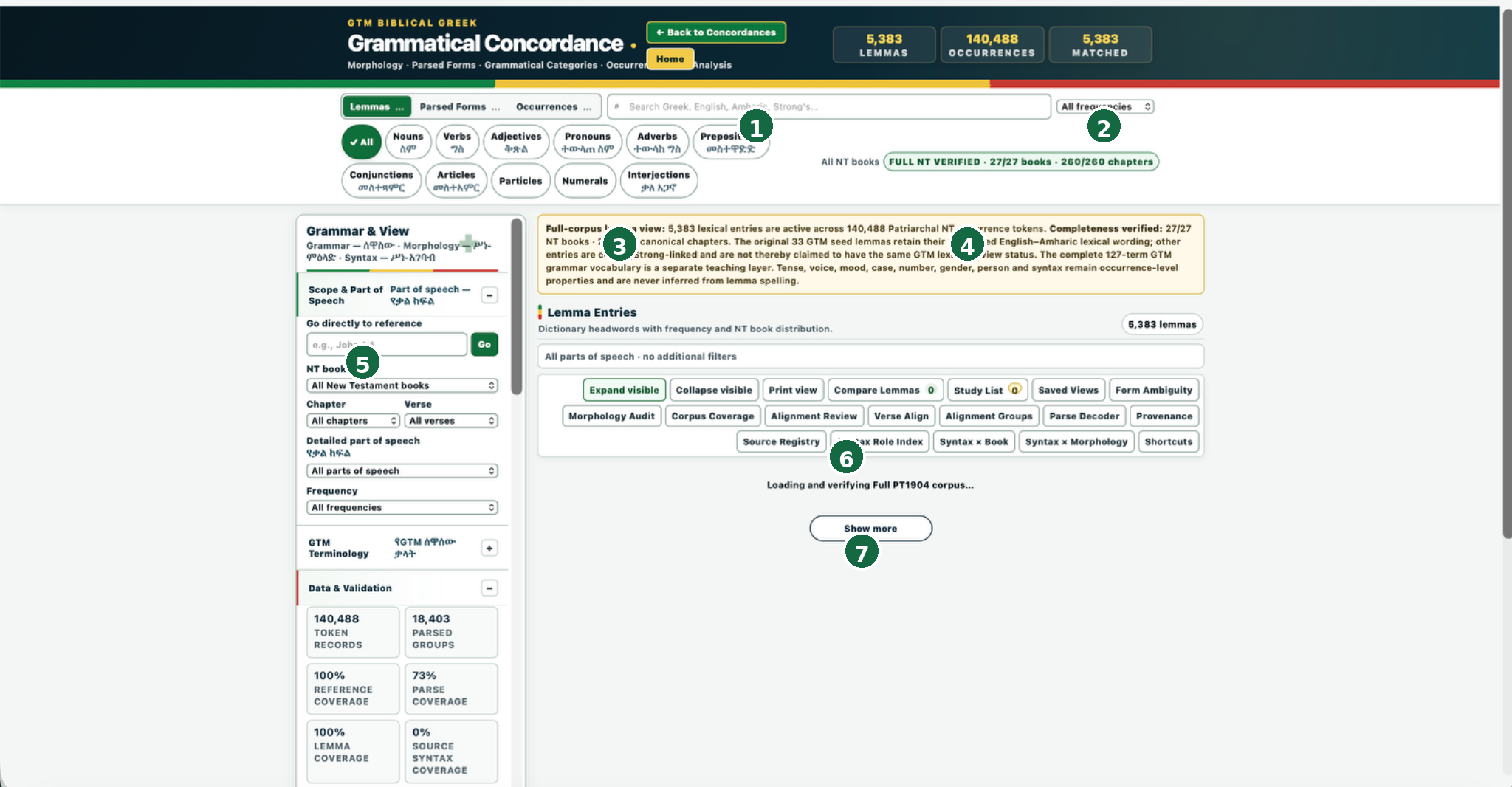
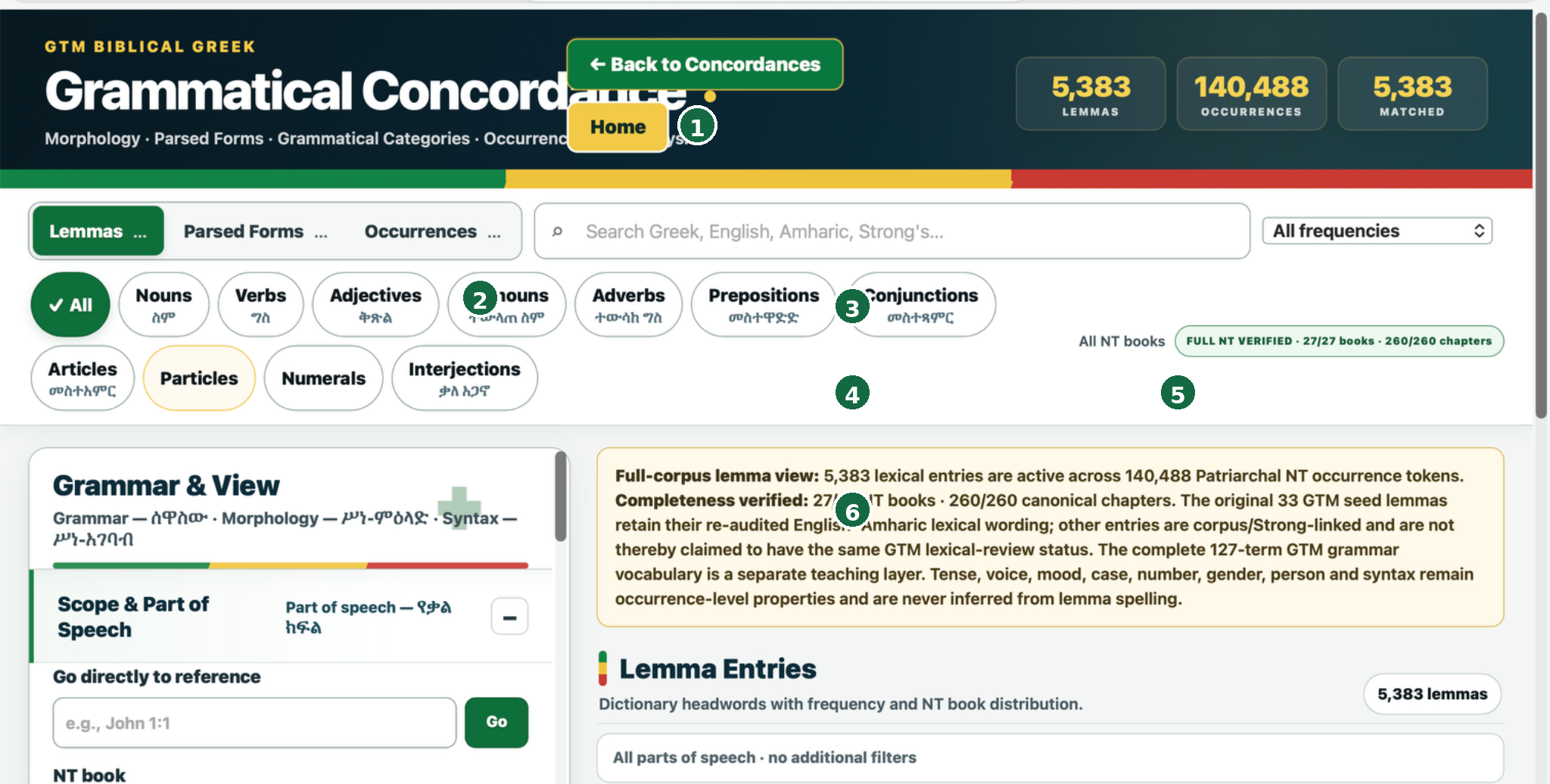
Grammatical Concordance with morphology/parsed forms/categories/occurrence analysis.Morphology/parsed forms/categories/occurrence analysis ያለው Grammatical Concordance።
Lemmas/parsed forms/tokens/matched change with the active mode/filter state.Lemmas/parsed forms/tokens/matched ቁጥሮች ከactive mode/filter state ጋር ይቀየራሉ።
Lemmas · Parsed Forms · Occurrences.Lemmas · Parsed Forms · Occurrences።
Text search plus a frequency control; semantics depend on the active mode.Text search እና frequency control፤ ትርጉሙ በactive mode ይወሰናል።
All · Nouns · Verbs · Adjectives · Pronouns · Adverbs · Prepositions · Conjunctions · Articles · Particles · Numerals · Interjections.All · Nouns · Verbs · Adjectives · Pronouns · Adverbs · Prepositions · Conjunctions · Articles · Particles · Numerals · Interjections።
Scrolls independently and contains the grammatical filters/terminology/data controls.በራሱ scroll ይደረጋል፣ grammatical filters/terminology/data controlsንም ይዟል።
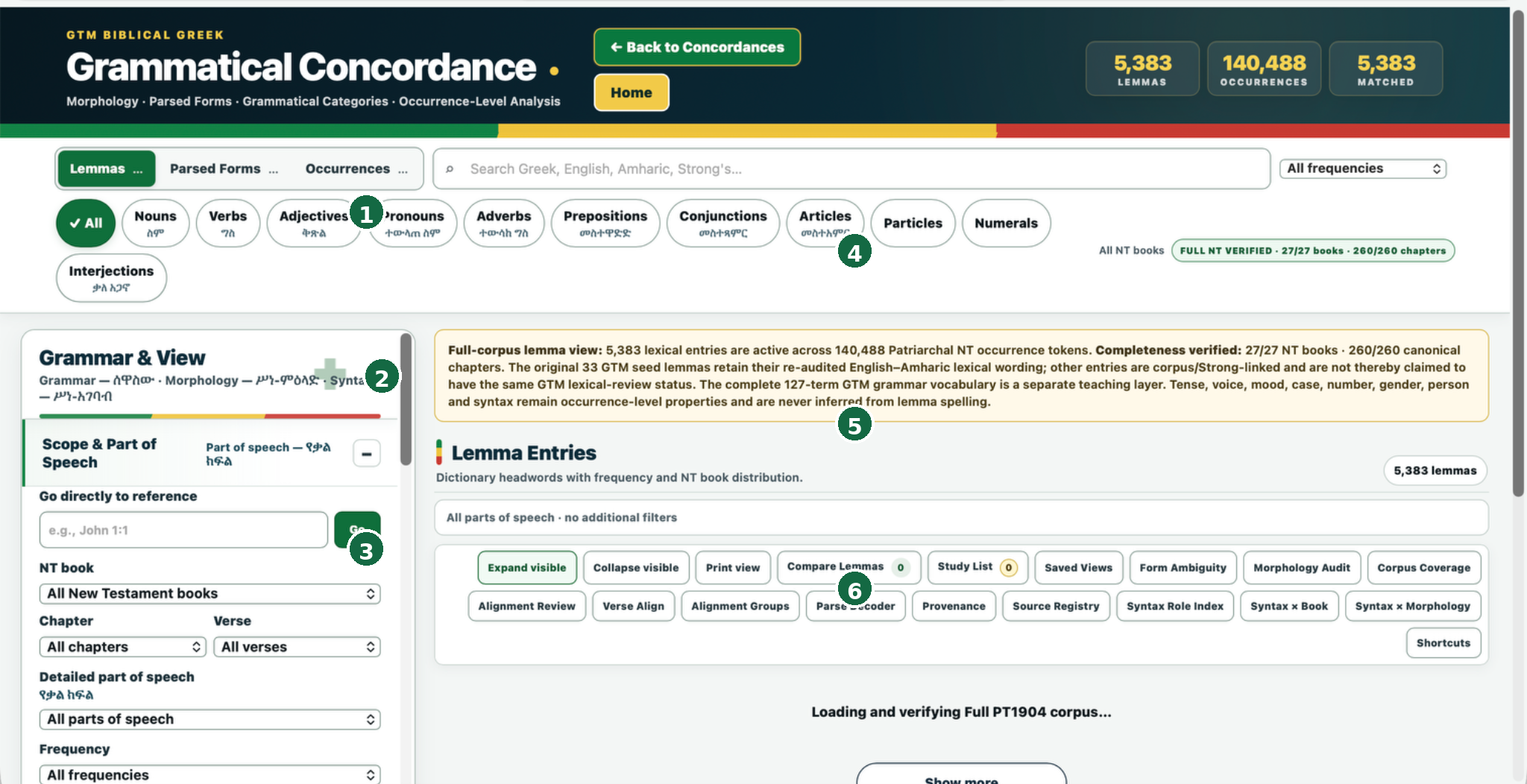
Named advanced tools; their position changes with zoom/window width, so use names rather than screen coordinates.ስም ያላቸው advanced tools፤ ቦታቸው በzoom/window width ስለሚቀየር screen coordinates ሳይሆን ስማቸውን ይጠቀሙ።
3. Lemma mode3. Lemma mode
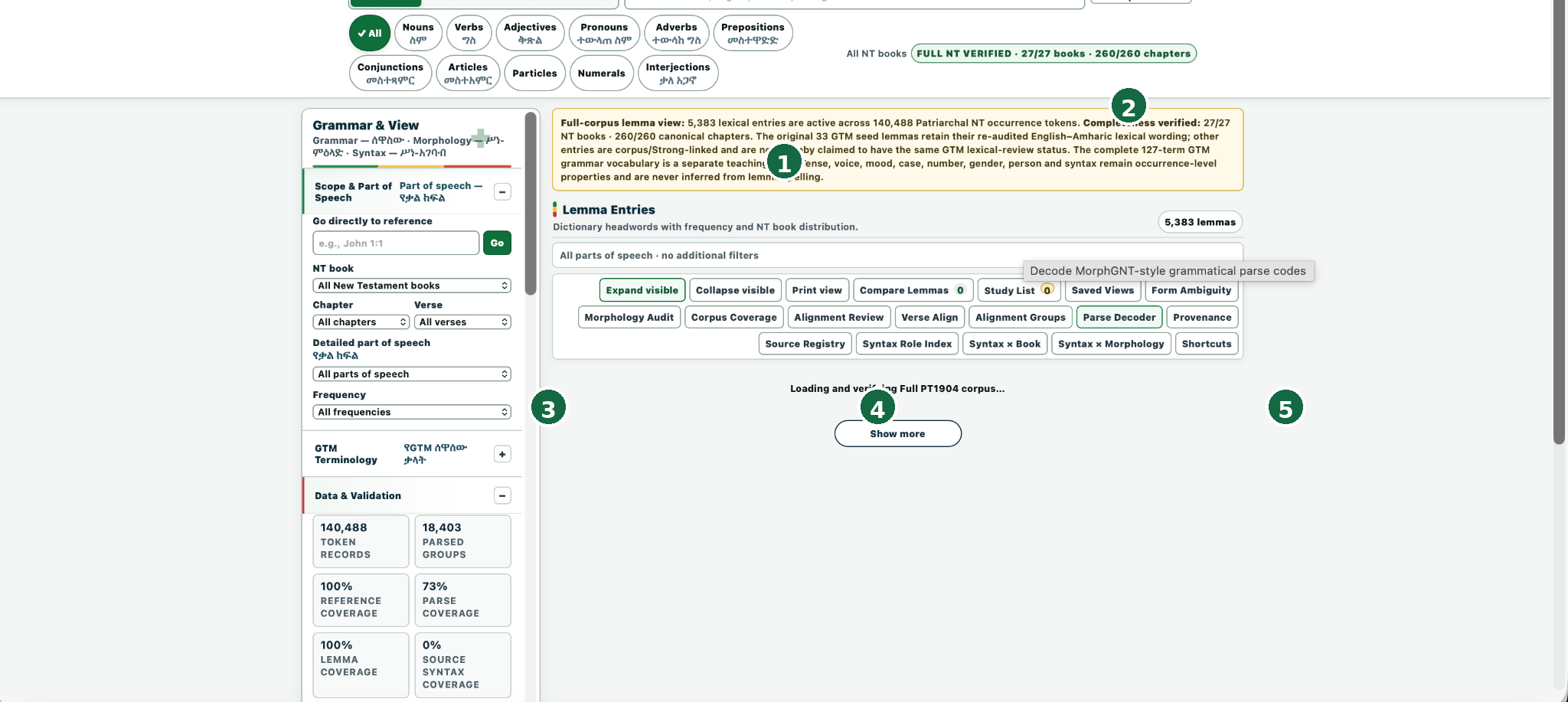
Searchingፍለጋው Χριστός in Lemmas currently returnsበLemmas ውስጥ በአሁኑ ጊዜ 3 lemmas. The matched counter and result count are dynamic; they are not fixed corpus constants. Lemma mode is appropriate for headword/frequency/book-distribution work, not for raw parse-code queries.የmatched counter እና result count dynamic ናቸው፤ ቋሚ corpus constants አይደሉም። Lemma mode ለheadword/frequency/book-distribution ስራ ተስማሚ ነው፤ ለraw parse-code queries አይደለም።
4. Parsed Forms mode4. የParsed Forms ሁነታ
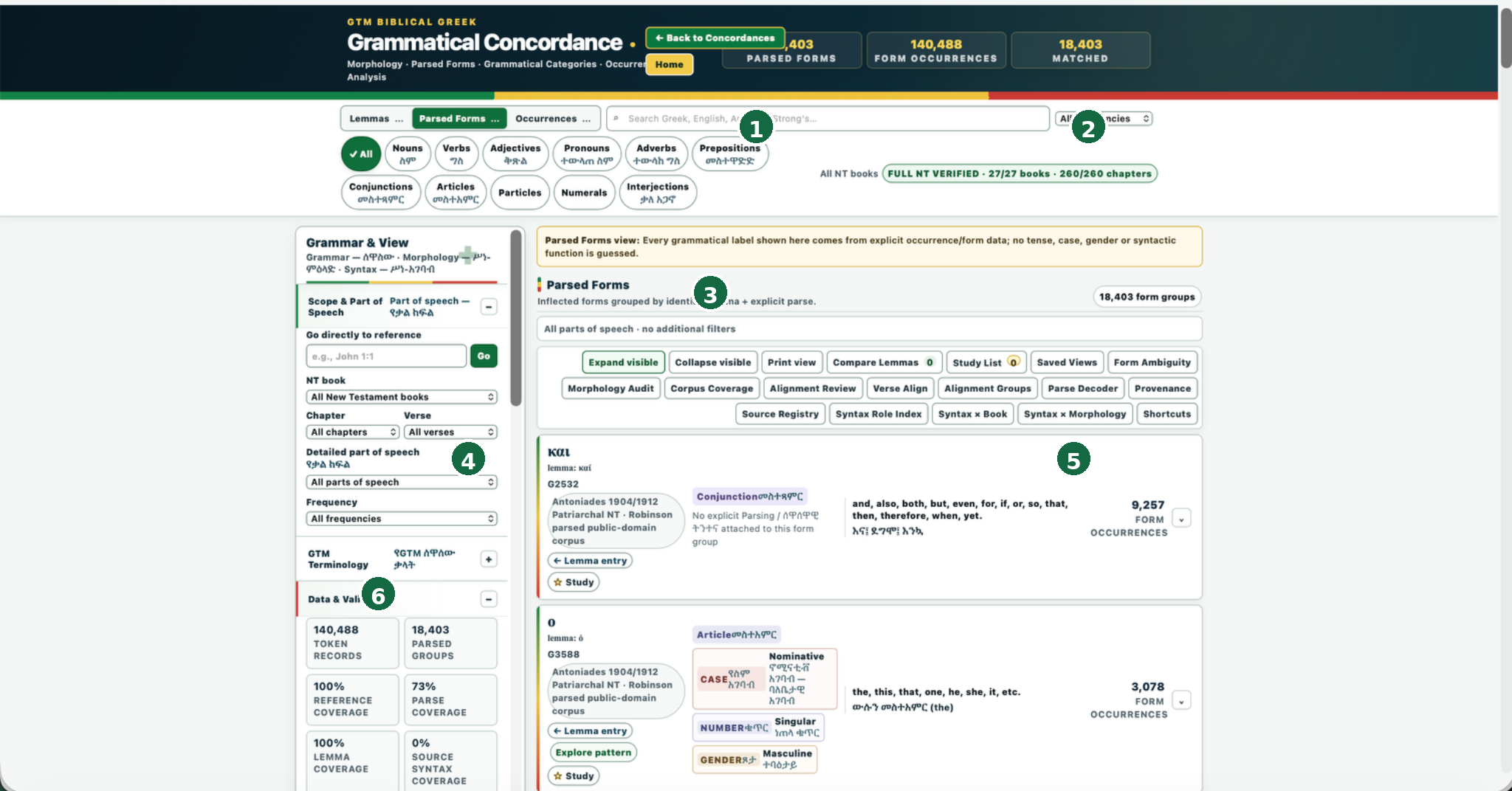
Unfiltered live state.ያልተጣራ live state።
Displayed grammatical labels come from occurrence/form data; no tense/case/gender/syntactic function is guessed.የሚታዩ grammatical labels ከoccurrence/form data የመጡ ናቸው፤ tense/case/gender/syntactic function አይገመትም።
Surface form + lemma + Strong’s/source/provenance.Surface form + lemma + Strong’s/source/provenance።
How many occurrence tokens belong to that identical lemma+parse group.በዚያ ተመሳሳይ lemma+parse group ውስጥ ያሉ occurrence tokens ብዛት።
Contextual research actions exposed by relevant cards.ተዛማጅ cards የሚያቀርቧቸው contextual research actions።
5. Nominal Parsing filters5. Nominal Parsing filters
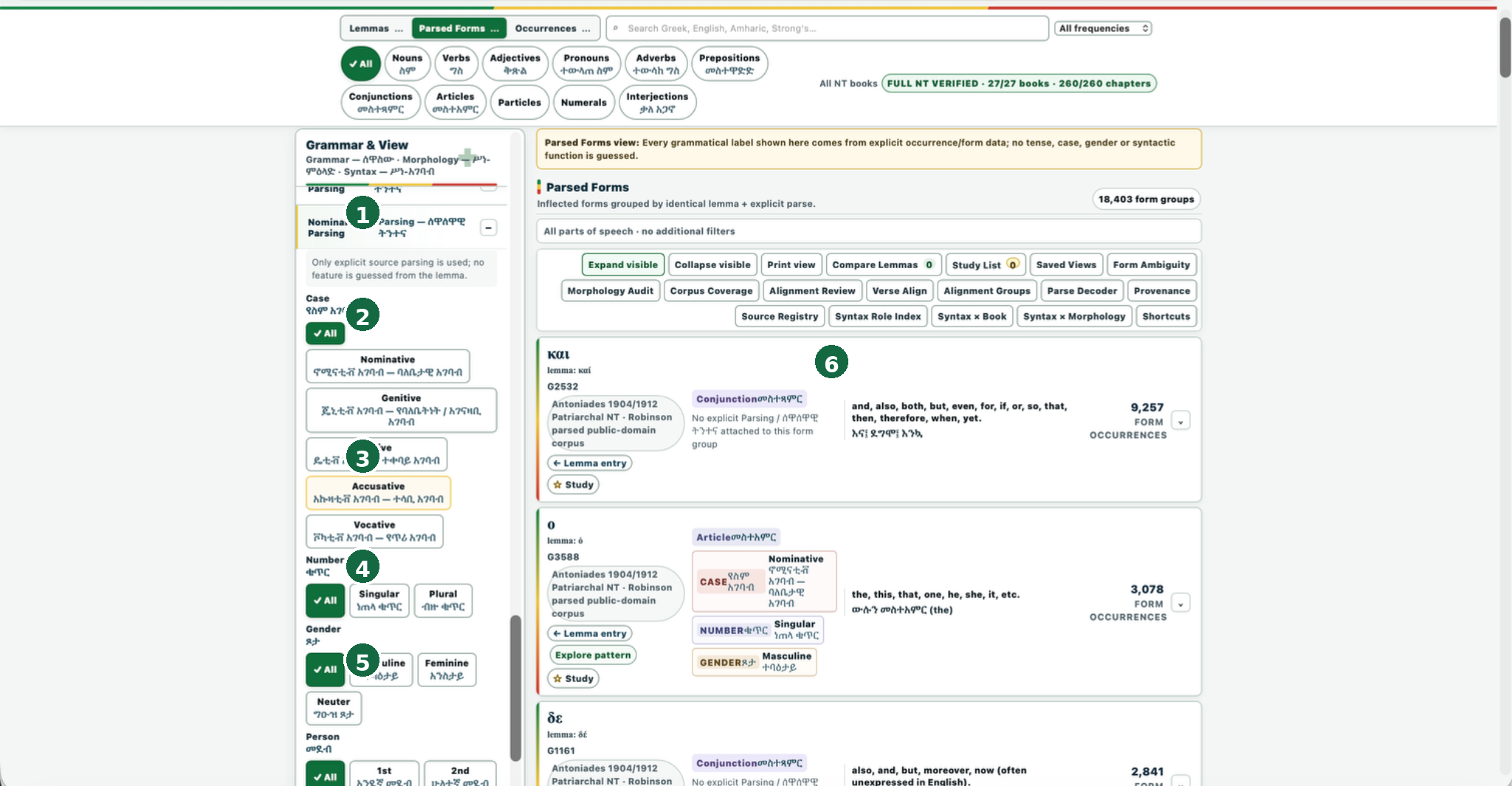
Open/close this filter group with its ± control.ይህን filter group በ± control ይክፈቱ/ይዝጉ።
All · Nominative · Genitive · Dative · Accusative · Vocative.All · Nominative · Genitive · Dative · Accusative · Vocative።
All · Singular · Plural.All · Singular · Plural።
All · Masculine · Feminine · Neuter.All · Masculine · Feminine · Neuter።
Continues below; relevant to person-bearing forms, not needed for the noun worked example.ከዚህ በታች ይቀጥላል፤ person-bearing forms ላይ ይጠቅማል፣ ለnoun worked example ግን አያስፈልግም።
Update according to the active filters.ከactive filters ጋር ተመሳስለው ይዘምናሉ።
6. Worked parse example: Noun + Genitive + Singular + Masculine6. የተሰራ የParsing ምሳሌ፦ Noun + Genitive + Singular + Masculine
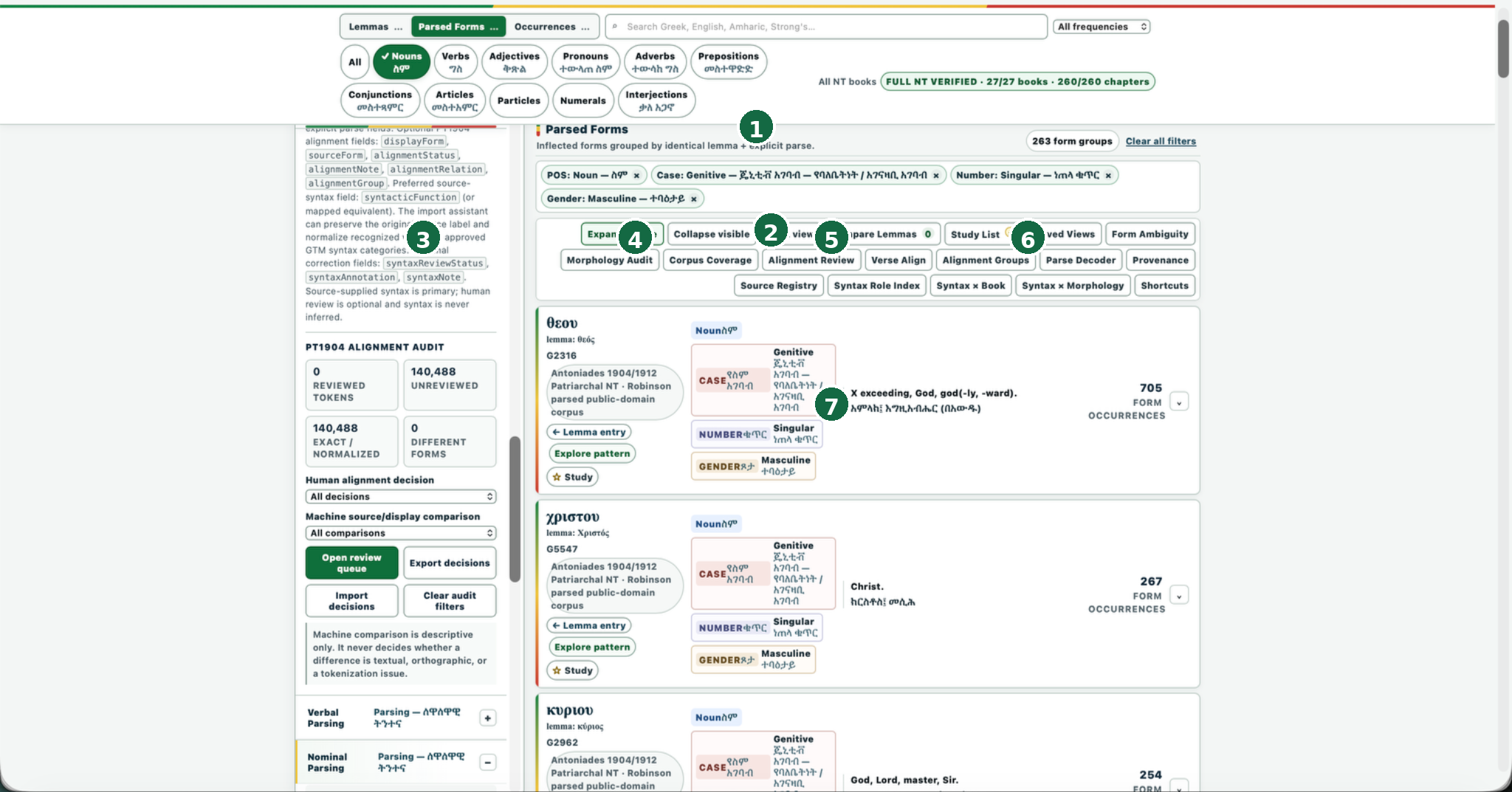
Live matched count for this filter combination.ለዚህ የማጣሪያ ጥምረት የአሁኑ ተዛማጅ ውጤት ብዛት።
Examples include θεοῦ, Χριστοῦ and κυρίου, each carrying explicit genitive/singular/masculine labels and form-occurrence counts.ምሳሌዎች θεοῦ፣ Χριστοῦ እና κυρίουን ያካትታሉ፤ እያንዳንዳቸው explicit genitive/singular/masculine labels እና form-occurrence counts አላቸው።
7. Occurrences mode7. የOccurrences ሁነታ
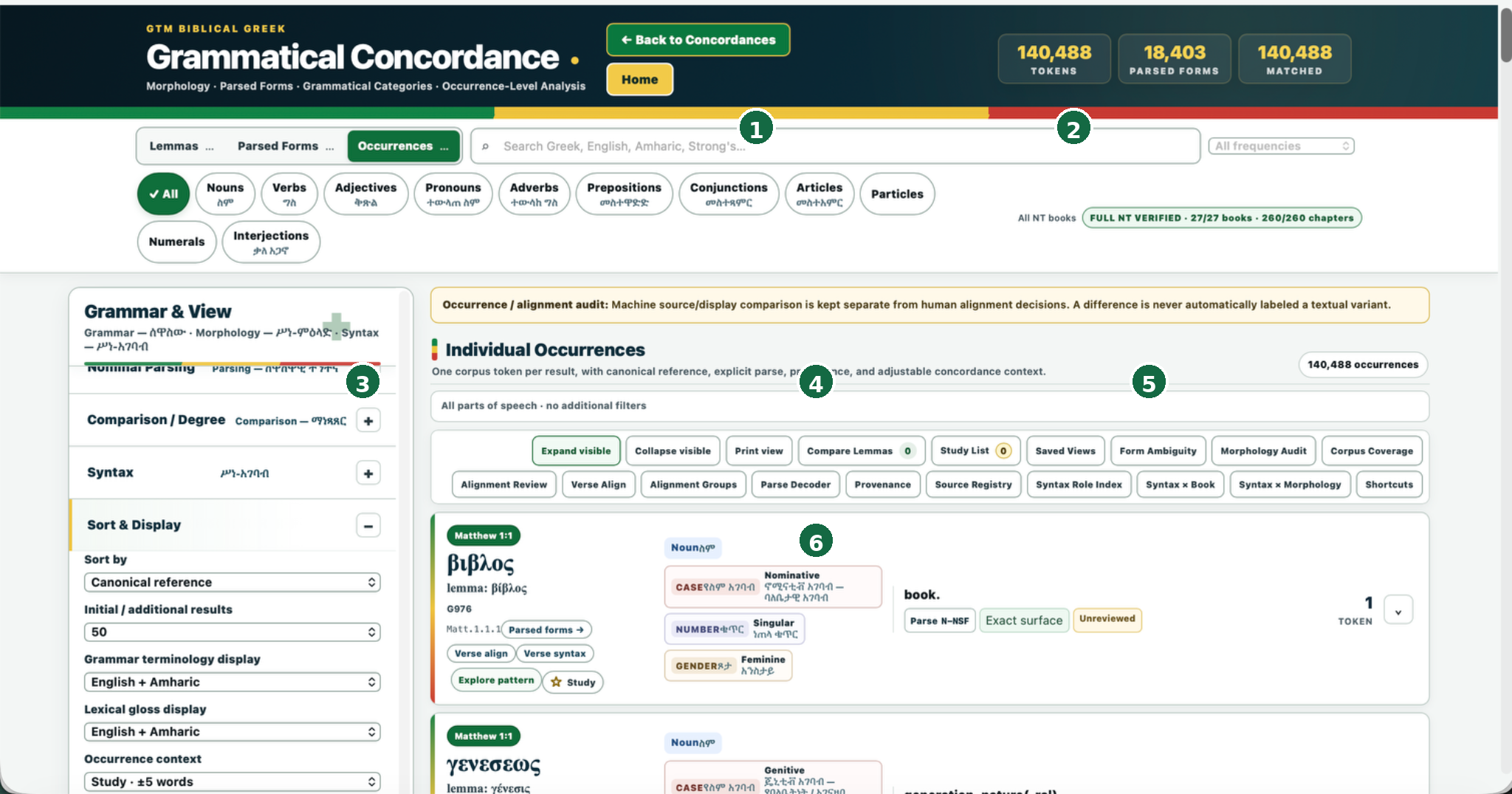
Unfiltered live state.ያልተጣራ live state።
Canonical reference, result count, terminology/gloss display, occurrence context.Canonical reference፣ result count፣ terminology/gloss display፣ occurrence context።
Canonical reference + Greek surface + lemma + Strong’s.Canonical reference + Greek surface + lemma + Strong’s።
Part of speech and grammatical labels such as case/number/gender.Part of speech እና case/number/gender ያሉ grammatical labels።
Parsed forms · Verse align · Verse syntax · Explore pattern · Study, where available.Parsed forms · Verse align · Verse syntax · Explore pattern · Study፣ ባሉበት።
The occurrence/audit banner states that machine source/display comparison is kept separate from human alignment decisions and that a difference is never automatically labeled a textual variant.Occurrence/audit banner የmachine source/display comparison ከhuman alignment decisions ተለይቶ እንደሚቀመጥ እና ልዩነት በራሱ textual variant ተብሎ እንደማይሰየም ይገልጻል።
8. Grammar & View panel8. Grammar & View panel
The left-side panel is an independent scrollable filter workspace. Depending on where you scroll and which groups are expanded, it exposes:የግራ በኩል panel ራሱን የቻለ scrollable filter workspace ነው። በሚያደርጉት scroll እና በተከፈቱ groups መሠረት የሚከተሉትን ያሳያል፦
9. Advanced research workspaces9. የላቁ የምርምር የስራ ቦታዎች
The live interface exposes these major workspaces/actions:Live interfaceው የሚከተሉትን major workspaces/actions ያቀርባል፦
10. Data & Validation10. Data & Validation
| Metric | Live valueየአሁኑ ዋጋ | Meaning |
|---|---|---|
| Token recordsየToken መዝገቦች | 140,488 | Occurrence-token corpus size.የoccurrence-token corpus መጠን። |
| Parsed groupsየተተነተኑ ቡድኖች | 18,403 | Distinct lemma + explicit-parse form groups.የተለያዩ lemma + explicit-parse form groups። |
| Reference coverageየReference ሽፋን | 100% | Canonical reference coverage.Canonical reference coverage። |
| Parse coverageየParsing ሽፋን | 73% | Current parsed-data coverage, not 100%.የአሁኑ parsed-data coverage፤ 100% አይደለም። |
| Lemma coverageየLemma ሽፋን | 100% | Lemma linkage/coverage.Lemma linkage/coverage። |
| Source syntax coverageየSource Syntax ሽፋን | 0% | Do not infer full source-syntax availability.ሙሉ source-syntax availability እንዳለ አትገምቱ። |
| Lexical auditየLexical ምርመራ | 1% | Current audit-status figure.የአሁኑ audit-status ቁጥር። |
| GTM termsየGTM ሰዋሰው ቃላት | 127 | Separate GTM grammar terminology teaching layer.የተለየ GTM grammar terminology teaching layer። |
| Alignment reviewedየተገመገመ Alignment | 0% | Human alignment-review status.Human alignment-review status። |
| Machine differencesበማሽን የተገኙ ልዩነቶች | 0 | Current machine-comparison count shown in this panel.በዚህ panel ውስጥ የሚታየው የአሁኑ machine-comparison count። |
The same area exposes alignment-audit controls such as Human alignment decision, Machine source/display comparison, Open review queue, Export decisions, Import decisions and Clear audit filters.ያው ክፍል Human alignment decision፣ Machine source/display comparison፣ Open review queue፣ Export decisions፣ Import decisions እና Clear audit filters ያሉ alignment-audit controlsንም ያቀርባል።
11. How to interpret the counts11. ቁጥሮቹን እንዴት መረዳት እንደሚገባ
- 5,383 lemmas is the active lexical-entry count in this Grammatical Concordance, which is different from the 5,460-lemma Complete Vocabulary/Lexical Concordance dataset.በዚህ Grammatical Concordance ውስጥ ያለው active lexical-entry count ነው፤ ከ5,460-lemma Complete Vocabulary/Lexical Concordance dataset የተለየ ነው።
- 18,403 parsed forms18,403 parsed forms are lemma+explicit-parse groups, not individual tokens.lemma+explicit-parse groups ናቸው፤ individual tokens አይደሉም።
- 140,488 occurrences140,488 occurrences are individual Patriarchal NT occurrence tokens.individual Patriarchal NT occurrence tokens ናቸው።
- Matched is dynamic and changes with mode/filter/search state (e.g., 3 for Χριστός in Lemmas, 263 form groups for Noun+Genitive+Singular+Masculine, 0 when a raw parse string was incorrectly searched as a lemma).Mode/filter/search state በሚቀየርበት ጊዜ dynamic ነው፤ ለምሳሌ Χριστός በLemmas ውስጥ 3፣ Noun+Genitive+Singular+Masculine 263 form groups፣ raw parse string በlemma ፍለጋ በስህተት ሲጻፍ 0።
- Coverage percentages report data availability/review state; they are not accuracy percentages and should not be read as theological or linguistic confidence scores.Coverage percentages የdata availability/review state ይገልጻሉ፤ accuracy percentages አይደሉም፣ እንደ theological ወይም linguistic confidence scores ሊነበቡ አይገባም።
12. Recommended workflows12. የሚመከሩ workflows
Find a grammatical classየሰዋሰው ምድብ ፈልግ
- Choose Parsed Forms.Parsed Formsን ይምረጡ።
- Select the relevant part of speech.ተዛማጅ part of speech ይምረጡ።
- Open the appropriate parsing group in Grammar & View.በGrammar & View ውስጥ ተገቢውን parsing group ይክፈቱ።
- Select explicit grammatical dimensions (case/number/gender etc.).Explicit grammatical dimensions (case/number/gender ወዘተ) ይምረጡ።
- Review matched form groups and occurrence counts.Matched form groups እና occurrence counts ይመርምሩ።
- Move to Occurrences for token-by-token context.Token-by-token context ለማየት ወደ Occurrences ይሂዱ።
Study one token in contextአንድ tokenን በአገባቡ ውስጥ አጥና
- Choose Occurrences.Occurrencesን ይምረጡ።
- Filter by reference/book/chapter/verse/part of speech or parsing dimensions.በreference/book/chapter/verse/part of speech ወይም parsing dimensions ያጣሩ።
- Open the token’s contextual actions (Parsed forms / Verse align / Verse syntax / Explore pattern / Study) as needed.እንደሚያስፈልግ Parsed Forms / Verse align / Verse syntax / Explore pattern / Study የሚሉ contextual actionsን ይክፈቱ።
- Use Corpus Coverage / Provenance / Source Registry before making claims about data scope.ስለdata scope ድምዳሜ ከመስጠትዎ በፊት Corpus Coverage / Provenance / Source Registry ይጠቀሙ።
13. Mobile / zoom behavior13. የMobile / Zoom ባህሪ
The Concordance is highly responsive and dense. Zoom/window width can reflow the action buttons, chips and side-panel proportions. On smaller screens or higher zoom, controls may wrap to additional rows. Use control names rather than remembered physical positions. When operating the Grammar & View panel, place the pointer/touch inside that panel before scrolling because it has its own internal scroll region.Concordanceው በጣም responsive እና dense ነው። Zoom/window width የaction buttons፣ chips እና side-panel proportionsን ሊያዘምን ይችላል። በትንሽ screens ወይም ከፍተኛ zoom ላይ controls ወደ ተጨማሪ rows ሊጠቀለሉ ይችላሉ። የቦታ ትውስታ ሳይሆን control namesን ይጠቀሙ። Grammar & View panel ሲጠቀሙ ራሱ የቻለ internal scroll region ስላለው ከመscroll በፊት pointer/touchን በpanel ውስጥ ያድርጉ።
14. Troubleshooting14. ችግኝ መፍቻ
| What you seeየሚታየው | What it means / what to doትርጉሙ / ማድረግ ያለብዎት |
|---|---|
| N-Gen-Sg-Masc gives 0 in LemmasበLemmas ውስጥ 0 ያሳያል | Expected: you searched a raw parse code in the lemma-search mode. Use Parsed Forms or Occurrences and the Nominal Parsing filters.የሚጠበቀው፦ raw parse codeን በlemma-search mode ፈልገዋል። Parsed Forms ወይም Occurrences እና Nominal Parsing filtersን ይጠቀሙ። |
| Buttons appear in different positionsአዝራሮቹ በተለያዩ ቦታዎች ይታያሉ | Responsive wrapping/zoom changed the layout; use the button name, not screen coordinates.Responsive wrapping/zoom layoutን ቀይሯል፤ screen coordinates ሳይሆን button nameን ይጠቀሙ። |
| You cannot see Nominal Parsingየስም ቃላት Parsingን ማየት አይችሉም | Scroll inside the Grammar & View panel and expand Nominal Parsing with its ± control.በGrammar & View panel ውስጥ scroll ያድርጉ እና Nominal Parsingን በ± control ያስፋፉ። |
| Only 73% parse coverage is shown73% የParsing ሽፋን ብቻ ይታያል | The corpus does not claim full explicit parse coverage. Filtered results come only from available explicit data.Corpusው ሙሉ explicit parse coverage አለኝ አይልም። Filtered results የሚመጡት ከሚገኘው explicit data ብቻ ነው። |
| Source syntax coverage is 0%የSource Syntax ሽፋን 0% ነው | Do not infer syntax from lemma spelling or assume a complete syntax layer. Use only source-supplied/mapped syntax where explicitly available.Syntaxን ከlemma spelling አትገምቱ፣ እና ሙሉ syntax layer እንዳለ አትገምቱ። Explicitly available በሆነበት source-supplied/mapped syntax ብቻ ይጠቀሙ። |
| You need quick lexical meaning rather than grammar researchከሰዋሰው ምርምር ይልቅ ፈጣን የቃል ትርጉም ይፈልጋሉ | Use Vocabulary Centre & Complete Reference or Lexical Concordance.Vocabulary Centre & Complete Reference ወይም Lexical Concordanceን ይጠቀሙ። |